This is the largest update the Hawker has had since launch, and most of it is about the parts of the aeroplane you touch. You can now plan your loading against the aircraft’s published CG envelope, fly the Pro Line 21 displays with a mouse, get an advisory descent path where the FMS previously gave you nothing, and do all of it with noticeably less load on the simulator’s main thread.
"Here is what is new, and why it matters."
Know where your CG is, and where it is going
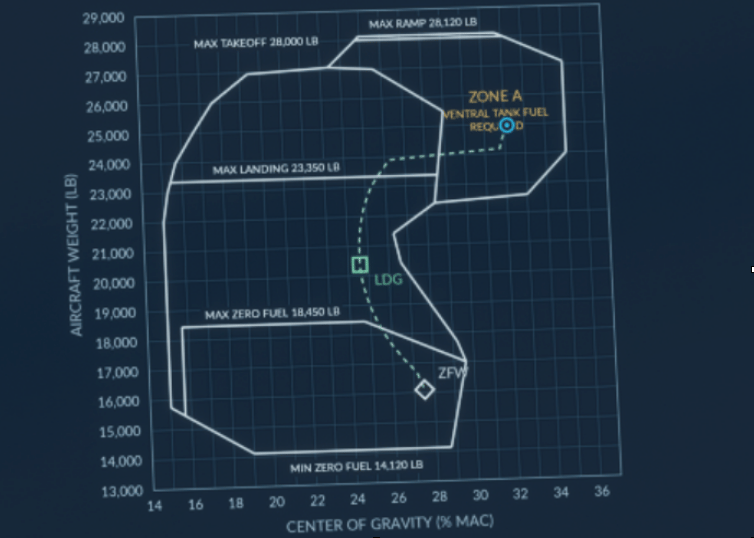
The Hawker is sensitive to how it is loaded, and until now the only way to know where the centre of gravity actually sat was to work it out for yourself. The EFB now plots the aeroplane on its published CG envelope, live, and shows you where the rest of the flight will take it.
The EFB Weights app now has two tabs. LOADS keeps the seat map you already know. CG is new, and it draws the aircraft’s published envelope with your current weight and centre of gravity plotted live on it, in percent MAC, following the lb/kg toggle you already have.
It does not stop at the current state. Using the FMC’s own trip fuel and time estimates, it forecasts where the aeroplane will be as fuel burns off, including the forward shift when the ventral tank transfers into the wings. You get a white takeoff marker captured at the moment you lift off, a green landing marker, a dashed forecast curve between them, and a white diamond at zero fuel weight. If the FMS data is stale or missing, the forecast simply disappears rather than guessing.A small convenience that turns out to change the flow of every departure: on the ground, triple-click the elevator trim wheel and the aircraft sets takeoff trim for its current centre of gravity.
Point and click: the PFD and MFD are now fully mouse-operable
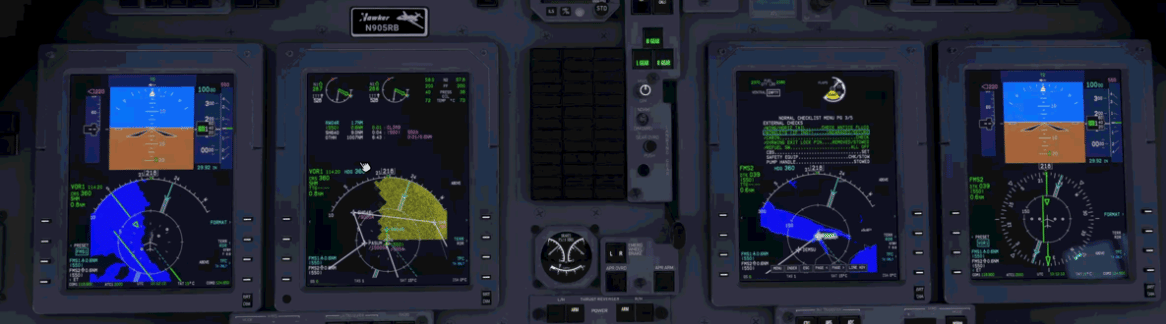
Not everyone flies with a hardware bezel, and reaching into the virtual cockpit to press a DCP button has always been the slowest part of operating this aircraft. Every CCP and DCP function is now reachable directly on the glass. Click a display and the shortcut controls appear; hover highlights the field you are about to change, and the scroll wheel edits it. V-speeds, minimums, radar gain, NAV and bearing sources, REFS pages — all of it works exactly as the physical controls do, because it dispatches the same commands.
The chart page gained the same treatment: drag to pan, click to zoom, and a new ROTATE control beside the zoom buttons to flip the plate through 90 degrees. On MFD2 you can work through the electronic checklist by clicking the rows.
If you fly with hardware and would rather not have mouse regions over your displays at all, there is a single switch in the EFB configuration app that turns the whole thing off without disturbing anything else.
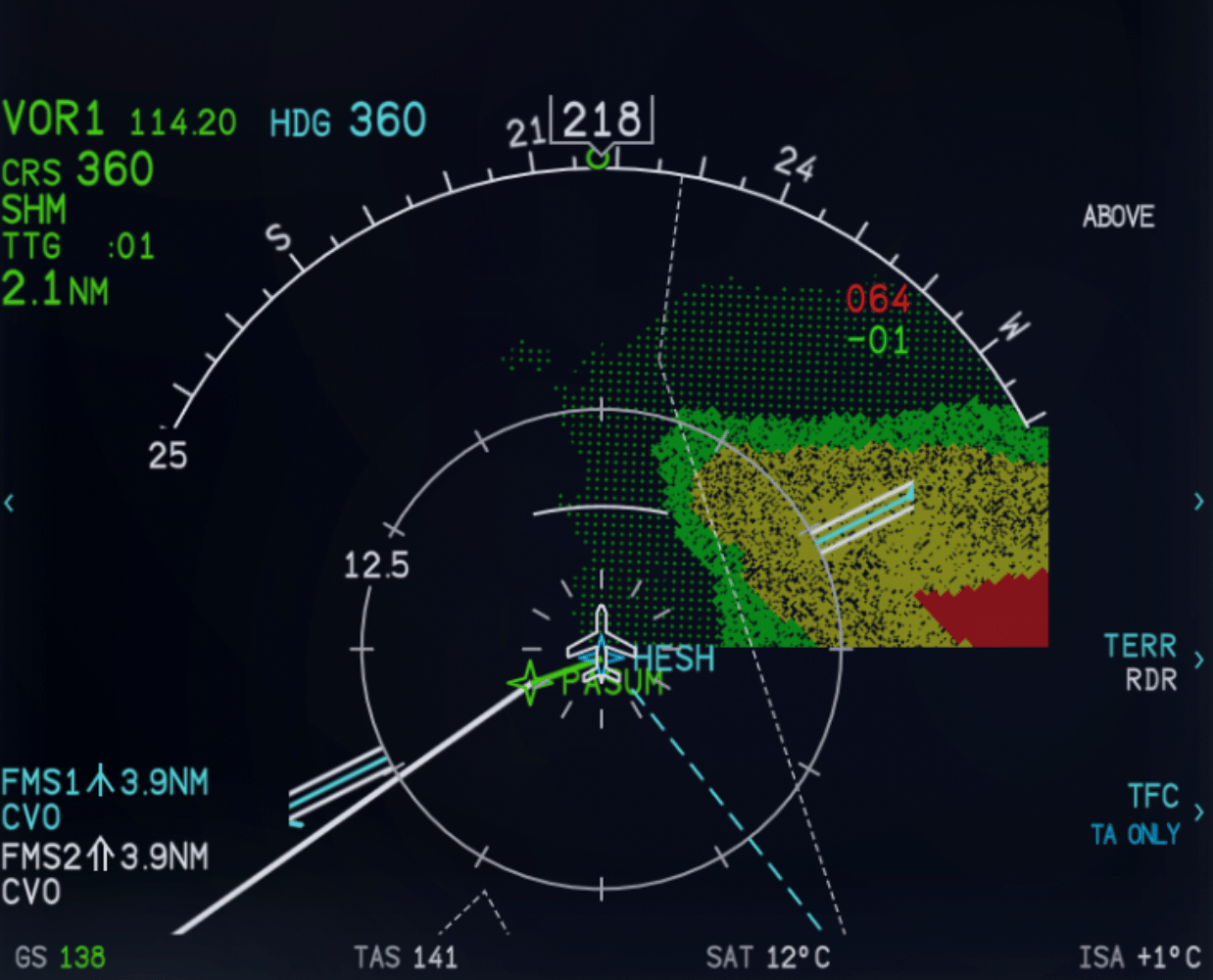
Terrain that looks like a Pro Line 21
Instead of the smooth, blurred wash the simulator produces by default, you now get the stepped elevation cells and the fine dot texture of the real display, at the correct opacity, confined to the forward sector where the real unit paints it.
We also added the highest and lowest terrain elevation readouts.
Descents
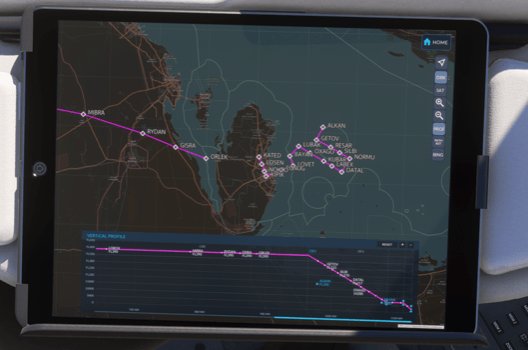
The biggest change here concerns discontinuities. Previously, a gap in the descent path , the ordinary result of a vectored arrival or an approach that has not been joined up yet, left you with no descent guidance at all. The FMS now computes an advisory path across the gap using great-circle distance, so you still get a vertical deviation to fly against. Coupled VPATH remains unavailable across a discontinuity, exactly as it should be; the advisory sections are drawn as dashed lines on the EFB vertical profile so it is always obvious which part of the descent the autopilot will actually fly.
Three smaller additions make the descent easier to catch:
An audible chime at top of descent.
An optional EFB setting that pauses the simulator 6 NM before the first top of descent — useful if you step away during a long cruise.
The vertical profile now accounts for the distance actually flown through turns, so the path no longer drifts out of step with the map on a turn-heavy arrival.
Wear and failures
A Failure Time Acceleration slider has been added to the EFB realism settings. At 1x, components wear at their normal rate; at 5x or 20x, a few sessions of hard handling will show up in the maintenance pages.
Detection got better at the same time. Flap and landing-gear overspeeds now cause damage proportional to how far past the placard you are, and sustained engine overspeeds now degrade the engine, including when the engine computers are switched off. Component health We also fixed and issue where percentages we rounding worn parts up to 100% Hiding a the slow wear and stresses happening behind the scenes.
The full list
This post covers the headline features. Here is the complete changelog for this release, including every fix to flight planning, autopilot annunciations, alerts and the EFB.
Optimisations
Fixed an issue causing some core systems code to run at an unnecessarily high frequency, increasing the burden on the main thread.
Fixed an issue with Geopol borders and city names causing large stutters at certain geographical locations.
Displays and Cockpit Interaction
Added direct mouse controls to the MFD and PFD, replicating their respective CCP and DCP controls. These interactions can be disabled in the EFB.
Updated the MFD CCP menu to more closely match the layout and operation of the real Hawker 800XP.
Improved MFD terrain rendering to more closely resemble the Pro Line 21 display, including highest and lowest terrain elevation readouts.
Fixed screen brightness controls causing displays to become excessively dim or go dark when entering clouds.
Reduced ESIS backup display brightness by 50% at night, returning smoothly to its existing daylight brightness as ambient light rises.
Fixed the PFD elapsed timer being unable to count past one hour. Beyond 59:59 it now displays hours and minutes in the format H1:59.
Added a ground-only quality-of-life shortcut: triple-clicking the elevator trim wheel sets takeoff trim for the aircraft's current centre of gravity.
Fixed flickering autopilot annunciations and selected-speed cues during taxi.
Fixed overlap between the MFD2 checklist and the lower map.
Corrected the vertical position of the left MFD's FMS text field.
Fixed overlap between the barometric minimums indication and elapsed-time display when engine instruments are shown on the PFD.
Corrected layout issues on the MFD POS REPORT pages.
GCS buttons now declutter their respective MFD maps correctly. Pressing a button again restores the previous display.
Smoothed EIS readouts to reduce flicker.
Added a click spot for toggling Active Noise Reduction on the headset port to the left of the pilot's shoulder.
Lavatory seatbelt sign now follows seatbelt signage logic.
Flight Planning and Navigation
Fixed flight-plan sequencing remaining inhibited during a turnaround after a new flight plan was entered.
Fixed erroneous CHECK APPROACH PERF and CHECK TAKEOFF PERF messages.
SimBrief transfers to the FMC now populate the runway field.
Improved approach/runway synchronization to address cases where an approach had to be entered twice before approach performance data became available.
Added manual runway identification entry on the approach performance page for approaches without an assigned runway.
Fixed ILS autotuning retaining the previous approach's frequency after an approach was changed in flight.
Fixed unexecuted flight-plan changes sometimes affecting active LNAV guidance.
Fixed flight-plan changes recalculating an active direct-to using outdated heading and bank data.
Added independent climb and descent transition-altitude entries on the VNAV pages.
Fixed values entered on the FMC DEFAULTS page not persisting.
VNAV and Vertical Profile
Updated the EFB vertical profile to account for distances flown through turns.
Improved advisory VNAV calculations when a discontinuity exists in the descent path. Calculations use a great-circle distance across the gap to provide advisory vertical deviation; coupled VPATH remains unavailable across the discontinuity. Advisory sections appear as dashed lines on the EFB vertical profile.
Added an audible chime at top of descent.
Added an optional EFB setting to pause the simulator 6 NM before the first top of descent.
The selected altitude must now remain unchanged for 10 seconds before it can raise the PERF cruise altitude. Lower selections do not reduce the PERF cruise altitude. This helps prevent unintended changes while adjusting the altitude selector.
Autopilot and Flight Guidance
The simulator's AUTO THROTTLE DISENGAGE command now disconnects the Hawker's ATS.
The ATS now respects the rating selected on the THRUST LIMIT page as its maximum thrust, in every mode.
Fixed flight-director guidance holding the aircraft below the glideslope in a strong headwind. The glideslope director was limited to 3 degrees nose up, which this aircraft is already using to hold the beam at approach speed, leaving it no authority to recover a low deviation.
Operating pitch trim with the autopilot engaged now disconnects the autopilot while retaining the yaw damper.
Pressing the FGP AP button with the autopilot engaged now disconnects the autopilot while retaining the yaw damper.
Corrected TO annunciations to display GA / GA.
Corrected the active RNAV glidepath annunciation to VGP. The armed annunciation remains GP.
Corrected active and armed approach lateral annunciations to include the APPR prefix, such as APPR LOC1, APPR FMS1, and APPR VOR1, with the appropriate navigation-source index.
Fixed the APPR prefix not updating when approach mode changed without a change in the underlying lateral mode.
Armed ALTS now changes to ALTV when VNAV is active and updates immediately when VNAV selection changes.
Performance, Weights and Flight Logging
Added a CG envelope display to the Weight and Balance app, showing the aircraft's current weight and centre of gravity against the published envelope.
Corrected THRUST LIMIT page TO / GA logic. A selected TO rating now remains engaged after takeoff until another rating is selected. Once another rating is selected, GA is blanked while either MAIN AIR valve is open and becomes available with both closed.
Fixed the PERF INIT basic operating weight (BOW) field rejecting edits or failing to follow configured FMC defaults.
SimBrief weight synchronization now populates BOW.
Added a persistent EFB configuration setting for FMC weight units, allowing lb or kg independently of the simulator's unit settings.
Fixed the FMC flight log resetting fuel used immediately after landing. Fuel used now resets only when a new flight plan is entered or the pilot clears the value using DELETE or a zero entry.
Fixed the passenger cabin display's travelled-distance calculation losing distance from earlier flight-plan legs after those legs were unloaded.
Engines, Fuel and Flight Dynamics
Reworked engine ITT and oil-temperature modelling for more realistic heating, cooling, and residual heat.
Corrected EFB engine-synoptic ITT colours to match the EIS.
Engine-specific operating differences now remain active when engine degradation is disabled. With degradation enabled, these differences can increase with use and are reflected more clearly in hydraulic, bleed-air, and oil pressures.
Slightly reduced ground idle thrust.
Fixed an issue causing the engine fan blades to stop and start abruptly rather than spinning down and up smoothly during startup and shutdown.
Corrected excessively slow wing-to-wing fuel transfer with the engines shut down and boost pumps running.
Running both boost pumps now equalizes tank pressure and prevents unintended wing-to-wing transfer caused by unequal fuel quantities. Wing-to-wing transfer requires a single boost pump.
Corrected the lateral positions of the left and right wing tanks.
Increased turbulence-detection sensitivity and refined the associated flight-model response.
Improved the inertial-effects system's response to turbulence.
Significantly reduced oxygen-system leak rates.
Wear, Failures and Persistence
Added a Failure Time Acceleration slider to the EFB realism settings to increase the rate of component wear.
Improved flap and landing-gear wear detection during overspeed conditions.
Improved engine wear detection during limit exceedances. Sustained excessive engine speeds now cause faster degradation, including when engine computers are switched off.
Fixed component-health rounding incorrectly displaying some worn components as having 100% health.
Fixed battery state not saving correctly with Total Persistence enabled.
Fixed Total Persistence remaining active during career missions, where it replaced the fuel and payload loaded by the mission with the last saved values and left no way to restore them. Total Persistence is now inert for the duration of a career mission and saves nothing, so free-flight snapshots are unaffected.
Alerts and Audio
Corrected BAG FIRE to trigger MWS flashing.
Removed unintended delays and queuing from altitude callouts.
Suppressed altitude callouts during climbs.
EFB, Cabin and Simulator Integration
Added a Support page to the EFB configuration app, with a QR-code link to manuals and a flight-plan diagnostic report generator.
Restored simulator fuel-truck attachments.
Updated strobe effect files to reduce unintended overrides by third-party add-ons.
Corrected cabin-lighting textures appearing pixelated at Medium and Low texture-quality settings.
Corrected the lavatory lights being supplied directly from the battery hot bus. On the ground they now require the cockpit battery switch to be ON or EMERG; airborne they remain available independently of the battery switch.
Corrected the direction of the cabin reading lights, which now shine correctly onto the seats.
Improved the viewing angles of the red and green navigation lights.
Apron and runway starts now default the annunciator brightness switch to BRT and the electrical meter selector to PE.
Fixed a short tone playing when the battery was cycled.
Fixed the aircraft thumbnail showing the FlightFX placeholder image in careers.
As always, thank you to everyone flying the aeroplane and telling us what is wrong with it. A large proportion of this release started as a message from someone in the community.